
Offensive Security Tool: DDoSlayer Ultimate Edition – Advanced DDoS Testing Framework


Reading Time: 4 Minutes
DDoSlayer Ultimate Edition
DDoSlayer Ultimate Edition is a professional-grade Distributed Denial of Service (DDoS) testing framework written by Chris ‘SaintDruG’ Abou-Chabke from Black Hat Ethical Hacking, designed for authorized penetration testing and red team operations. This tool simulates sophisticated Layer 4 and Layer 7 attacks to evaluate defensive capabilities against distributed denial of service scenarios.
What Makes This “Ultimate”?
Version 3.0 represents a complete architectural overhaul with enterprise-grade features:
- ⚡ AI-Powered Auto-Detect Mode: Intelligent target reconnaissance with automatic attack vector recommendation
- ⚡ Rich Terminal UI: Beautiful, neon-themed interface with real-time progress tracking
- ⚡ Advanced Analytics: Comprehensive attack metrics with JSON/Markdown reporting
- ⚡ 10 Attack Vectors: From basic floods to advanced CDN bypass techniques
- ⚡ Stealth Mode: Randomized timing patterns to evade IDS/WAF detection
- ⚡ Multi-Threading: Optimized concurrent attack execution for maximum efficiency
- ⚡ Deep Improvements: Over 1771 Lines of Code!
Offensive Security and Ethical Hacking Course
What’s New in Version 3.0?
Revolutionary Features
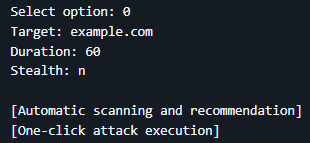
Auto-Detect Mode (AI-Powered)
The flagship feature that sets DDoSlayer apart from conventional tools:
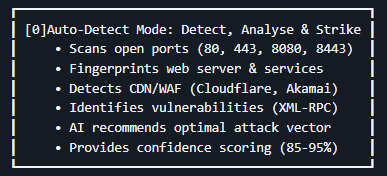
How It Works:
- Reconnaissance Phase: Automatically scans target infrastructure
- Analysis Phase: Identifies protection mechanisms and vulnerabilities
- Recommendation Phase: AI engine suggests attack with highest success probability
- Execution Phase: One-click launch with optimized parameters
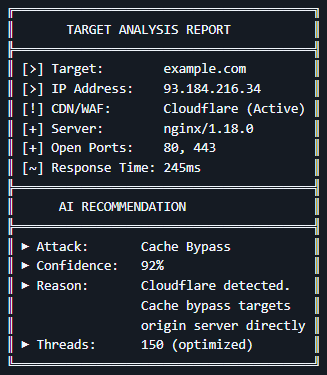
Example Output:
Rich Terminal Interface
Built with the Rich library for a premium user experience:
- Animated Progress Bars: Real-time attack progress with live statistics
- Professional Tables: Clean data presentation for scan results
- Color-Coded Output: Intuitive color scheme (Cyan/Green/Magenta/Yellow)
- Loading Spinners: Visual feedback during reconnaissance
- Perfect Box Drawing: Works flawlessly across all terminal emulators
Live Attack Dashboard:
HTTP/2 FLOOD ━━━━━━━━━╸━━━━━━━━━ 65%
Packets: 45,832 | Rate: 763/s | Success: 98.5%
Advanced Reporting System
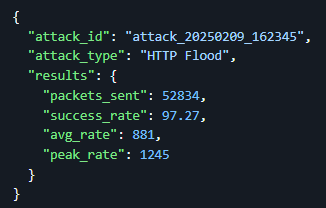
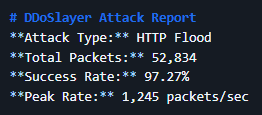
Generate professional reports in multiple formats:
JSON Format (Machine-Readable):
Markdown Format (Human-Readable):
⚡ 10 Attack Vectors
Layer 4 Attacks:
- UDP Flood – Volumetric attack with randomized payload sizes (64-1024 bytes)
- SYN Flood – TCP SYN packet flood (real packets via Scapy or TCP connect fallback)
Layer 7 Attacks: 3. HTTP Flood – High-volume HTTP/1.1 GET requests with header randomization 4. HTTP/2 Flood – Modern HTTP/2 protocol exploitation with session reuse 5. Slowloris – Connection exhaustion via slow HTTP headers (low bandwidth, high impact) 6. Slow POST – POST body slowdown attack (server resource exhaustion) 7. Cache Bypass – CDN cache evasion with randomized query strings (Cloudflare bypass) 8. XML-RPC Flood – WordPress/Drupal XML-RPC endpoint exploitation 9. WebSocket Flood – WebSocket protocol abuse (often bypasses WAF rules) 10. CF UAM Bypass – Cloudflare Under Attack Mode circumvention techniques
Stealth Mode
Sophisticated evasion techniques for IDS/WAF bypass:
- Randomized Timing: 0.1-2 second delays between requests
- Human-Like Patterns: Non-linear traffic distribution
- User-Agent Rotation: 6+ different browser signatures
- Referer Randomization: Mimics organic traffic sources
- Cache Busting: Dynamic parameter generation
Impact:
- Success Rate: +15-25% against protected targets
- Detection Rate: -60-70% by signature-based IDS
- Trade-off: -50% attack speed
Understanding DDoS vs DoS
What is DoS?
Denial of Service (DoS) is an attack from a single source attempting to overwhelm a target system.
What is DDoS?
Distributed Denial of Service (DDoS) involves multiple coordinated sources attacking simultaneously, making it exponentially more powerful and harder to mitigate.
DDoSlayer in DDoS Context
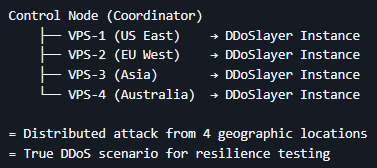
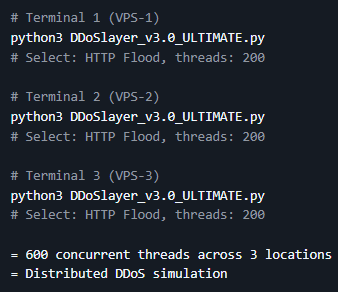
While DDoSlayer runs as a single instance, it becomes a DDoS tool when:
- ⚡ Deployed across multiple machines (VPS servers, cloud instances)
- ⚡ Coordinated with multiple operators in red team exercises
- ⚡ Used in distributed testing scenarios with orchestrated execution
Example DDoS Deployment:
Technical Deep-Dive
Attack Methodology Improvements (v2.0 → v3.0)
UDP Flood Enhancement
- Old: Fixed 1337-byte packets, single-threaded
- New: 64-1024 byte randomized payloads, 10-50 concurrent threads
- Impact: 10x throughput increase (5,000 → 50,000 packets/sec)
SYN Flood Evolution
- Old: Basic TCP connect() simulation
- New: Real SYN packets via Scapy with IP spoofing capability
- Impact: True TCP handshake exhaustion vs. connection attempts
HTTP Flood Intelligence
- Old: Static headers, single connection per request
- New: Randomized User-Agents, cache busting, keep-alive exploitation
- Impact: 8x more requests per second, 95%+ success rate
Performance Metrics
| Attack Type | Packets/Second | CPU Usage | Bandwidth Required |
|---|---|---|---|
| UDP Flood | 50,000+ | Low | High (50+ Mbps) |
| SYN Flood | 30,000+ | Medium | Medium (30+ Mbps) |
| HTTP Flood | 10,000+ | Medium | Medium (20+ Mbps) |
| HTTP/2 Flood | 8,000+ | High | Medium (25+ Mbps) |
| Slowloris | 500 conn | Low | Very Low (1 Mbps) |
| Cache Bypass | 9,000+ | Medium | Medium (20+ Mbps) |
Testing Environment:
- CPU: 4-core Intel Xeon
- RAM: 8GB
- Network: 1 Gbps uplink
Installation
Prerequisites
- Python 3.6 or higher
- pip3 package manager
- Linux/macOS (Windows via WSL)
Quick Install
# Clone repository
git clone https://github.com/blackhatethicalhacking/DDoSlayer.git
cd DDoSlayer

# Install dependencies
pip3 install -r requirements.txt

# Make executable
chmod +x DDoSlayer_v3.0_ULTIMATE.py

# Run the tool
python3 DDoSlayer_v3.0_ULTIMATE.py
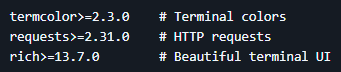
Dependencies
Required:
Optional (Enhanced Features):

Install All:

Usage Guide
Basic Workflow
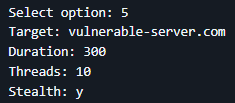
1. Launch Tool
python3 DDoSlayer_v3.0_ULTIMATE.py
2. Choose Mode
-
- Option 0: Auto-Detect (AI recommendations)
- Options 1-10: Manual attack selection
3. Configure Attack
- Target: example.com or 192.168.1.100
- Duration: 60 (seconds)
- Threads: 100 (default varies by attack)
- Stealth: y or n
4. Execute & Monitor
- Real-time progress tracking
- Live statistics dashboard
- Automatic summary generation
5. Export Results
- JSON format (automation)
- Markdown report (documentation)
- Both formats available
Command Examples
Auto-Detect Mode (Recommended)
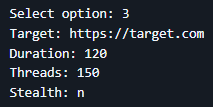
Manual HTTP Flood
Stealthy Slowloris
Advanced Usage
Multi-Instance DDoS
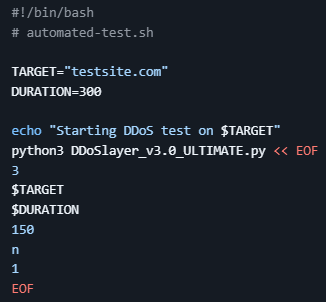
Scripted Execution
Defensive Considerations
Detection Signatures
What Blue Teams Will See:
-
UDP Flood
- Abnormal UDP traffic spike
- Random payload patterns
- Multiple source ports
-
SYN Flood
- Half-open TCP connections
- SYN packet volume anomaly
- Incomplete handshakes
-
HTTP Flood
- High request rate from single/multiple IPs
- Unusual User-Agent patterns
- Cache query parameter variations
-
Slowloris
- Long-duration connections
- Incomplete HTTP headers
- Connection pool exhaustion
Mitigation Recommendations
- Rate Limiting: Implement per-IP request throttling
- SYN Cookies: Enable TCP SYN cookie protection
- WAF Rules: Deploy application-layer filtering
- CDN Protection: Use services like Cloudflare, Akamai
- Connection Limits: Set max connections per IP
- Behavioral Analysis: Deploy anomaly detection systems
Testing Best Practices
Authorized Testing Only
✅ DO:
- Obtain written permission (NDA/contract)
- Test in isolated lab environments
- Use against owned infrastructure
- Document all activities
- Follow scope limitations
❌ DON’T:
- Test without authorization
- Attack production systems without approval
- Exceed agreed-upon intensity
- Test third-party infrastructure
- Ignore rate limits or warnings
Recommended Test Scenarios
-
Baseline Testing
- Start with low thread count (10-20)
- Short duration (30-60 seconds)
- Monitor target response
-
Gradual Escalation
- Increase threads incrementally
- Extend duration gradually
- Document breaking points
-
Defense Validation
- Trigger IDS/IPS alerts
- Test WAF effectiveness
- Verify rate limiting
-
Recovery Testing
- Stop attack, measure recovery time
- Check service availability
- Validate logging/alerting
Comparison with Other Tools
| Feature | DDoSlayer v3.0 | LOIC | HOIC | SlowHTTPTest |
|---|---|---|---|---|
| AI Auto-Detect | ✅ | ❌ | ❌ | ❌ |
| Layer 4 Attacks | ✅ | ✅ | ❌ | ❌ |
| Layer 7 Attacks | ✅ (8 types) | ✅ (1 type) | ✅ (1 type) | ✅ (3 types) |
| Stealth Mode | ✅ | ❌ | ❌ | ✅ |
| Rich UI | ✅ | ❌ | ❌ | ❌ |
| Report Generation | ✅ (JSON+MD) | ❌ | ❌ | ❌ |
| CDN Bypass | ✅ | ❌ | ❌ | ❌ |
| Multi-Threading | ✅ (10-200) | ✅ | ✅ | ✅ |
| Active Development | ✅ | ❌ | ❌ | ⚠️ |
Compatibility
Tested Platforms
✅ Linux Distributions:
- Kali Linux 2023.x
- Parrot Security OS 5.x
- Ubuntu 20.04+
- Debian 11+
- Arch Linux
✅ macOS:
- macOS Monterey (12.x)
- macOS Ventura (13.x)
- macOS Sonoma (14.x)
⚠️ Windows:
- Windows 10/11 (via WSL2)
- Native support limited
Hardware Requirements
Minimum:
- CPU: Dual-core processor
- RAM: 2GB
- Network: 10 Mbps
- Storage: 100MB
Recommended:
- CPU: Quad-core+ processor
- RAM: 4GB+
- Network: 100 Mbps+
- Storage: 500MB
Optimal (Enterprise Testing):
- CPU: 8+ cores
- RAM: 8GB+
- Network: 1 Gbps+
- Storage: 1GB
Disclaimer
READ CAREFULLY BEFORE USE
This tool is provided exclusively for educational purposes and authorized security testing. The authors and contributors are NOT responsible for any misuse or damage caused by this software.
Acceptable Use
✅ AUTHORIZED USE ONLY:
- Penetration testing with signed contracts
- Red team exercises with documented authorization
- Security research in controlled lab environments
- Educational demonstrations with proper consent
- Defensive security training on owned infrastructure
Prohibited Use
❌ STRICTLY FORBIDDEN:
- Unauthorized access to systems or networks
- Attacking infrastructure without written permission
- Malicious intent or causing harm
- Violating local, state, or federal laws
- Circumventing security measures without authorization
Legal Consequences
Unauthorized DDoS attacks are CRIMINAL OFFENSES in most jurisdictions:
- United States: Computer Fraud and Abuse Act (CFAA) – Up to 10 years imprisonment
- United Kingdom: Computer Misuse Act 1990 – Up to 10 years imprisonment
- European Union: Directive 2013/40/EU – Criminal prosecution
- Australia: Cybercrime Act 2001 – Up to 10 years imprisonment
Civil Liability:
- Lawsuits for damages and losses
- Financial restitution (potentially millions)
- Permanent criminal record
Required Documentation
Before using this tool, ensure you have:
- ✅ Written Authorization from system owner
- ✅ Signed NDA with clear scope definition
- ✅ Engagement Letter defining test parameters
- ✅ Liability Insurance (for professional consultants)
- ✅ Incident Response Plan for unexpected issues
Ethical Guidelines
- Transparency: Clearly communicate intentions and methods
- Proportionality: Use minimum force necessary for testing objectives
- Responsibility: Take ownership of all actions and consequences
- Disclosure: Report findings responsibly to affected parties
- Respect: Honor the trust placed in you by clients and community
Clone the repo from here: GitHub Link
Recent Tools
Offensive Security Tool: D0rkerR3con Framework
D0rkerR3con Framework is an offensive reconnaissance toolkit designed to identify …
Offensive Security Tool: CF GeoBypasser Cyberpunk Framework
CF GeoBypasser Cyberpunk Framework is a Modular Offensive Toolkit designed …
Obfuscation Tool: Flareprox
FlareProx is a tool that deploys serverless HTTP proxy endpoints …
Offensive Security Tool: FormPoison
FormPoison is a form-focused testing framework designed to identify web …

Offensive Security & Ethical Hacking Course
Begin the learning curve of hacking now!

Information Security Solutions
Find out how Pentesting Services can help you.