FileFix Attack Abuses Windows File Explorer to Execute Hidden PowerShell Commands

A cybersecurity researcher has uncovered a new variant of the ClickFix attack, dubbed FileFix, that leverages Windows File Explorer’s address bar to trick users into executing malicious commands on their systems.
Discovered by the well-known researcher mr.d0x, FileFix builds on the principles of ClickFix — a social engineering technique where users are manipulated into copying and pasting malicious commands to “resolve” fake system issues. But FileFix takes this further by exploiting users’ trust in the familiar File Explorer interface.
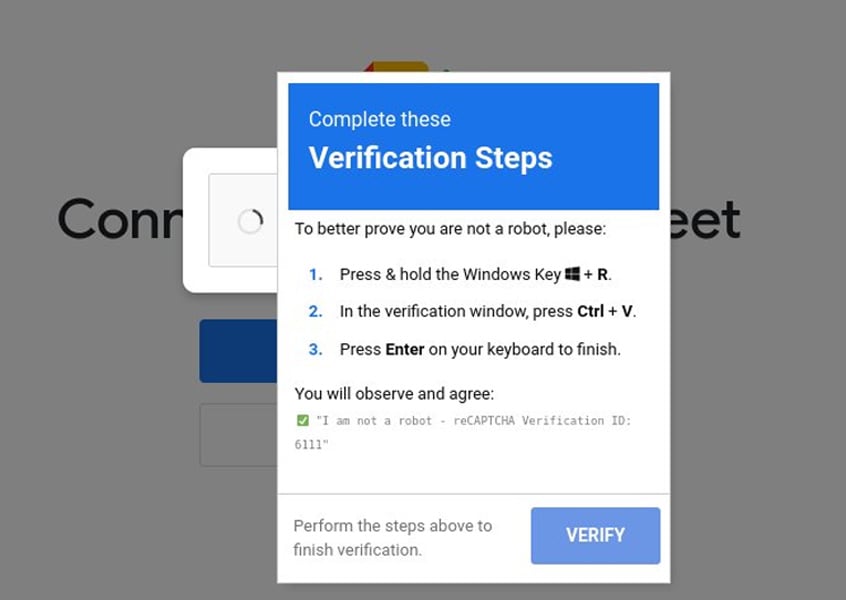 Example of a fake CAPTCHA in a ClickFix attack
Source: SilentPush
From ClickFix to FileFix
Traditional ClickFix attacks rely on:
- Phishing web pages that display fake errors (e.g., broken captchas)
- Buttons that copy PowerShell commands to the clipboard
- Instructions for users to paste the command into PowerShell or the Run dialog (Win+R)
These attacks have already been used by ransomware groups and state-sponsored actors like North Korea’s Kimsuky, who combined ClickFix techniques with document lures and fake device registration portals.
FileFix refines this technique by shifting the execution environment to File Explorer. The new approach:
- Uses a phishing page posing as a file-sharing notification
- Encourages users to paste a path into File Explorer to “access” the file
- Hides malicious PowerShell commands by embedding them before a dummy file path within a PowerShell comment
- Leverages File Explorer’s ability to process and execute OS commands directly from its address bar
“The phishing page includes an ‘Open File Explorer’ button that, when clicked, launches File Explorer through the file upload functionality and copies the PowerShell command to the clipboard,” explained mr.d0x.
A proof-of-concept demo shows that users see only the fake file path while the hidden PowerShell command executes silently.
See Also: So, you want to be a hacker?
Offensive Security, Bug Bounty Courses
Discover your weakest link. Be proactive, not reactive. Cybercriminals need just one flaw to strike.

Deceptive Refinements
To avoid accidental file uploads, mr.d0x’s proof-of-concept:
- Blocks file selection events in the file upload dialog
- Automatically clears input to prevent unintended file submission
- Prompts users to try again if they deviate from the scripted process
This polished deception enhances the likelihood of success, especially among non-technical employees.
High Likelihood of Adoption
Given its simplicity and the trusted nature of File Explorer, mr.d0x believes FileFix will soon be integrated into threat actor toolkits.
“Such phishing attacks can be improved by switching command execution to an environment that is friendlier and more familiar to users,” he noted.
History supports this prediction. mr.d0x’s prior work, such as the Browser-in-the-Browser (BitB) phishing technique, was rapidly weaponized by cybercriminals following its disclosure.
Trending: Using Favicon for OSINT
Call to Action
Defenders should take immediate steps to:
- Educate employees about the risks of copying and pasting commands from untrusted sources
- Restrict or monitor clipboard usage and PowerShell command execution where feasible
- Harden browser and endpoint security controls to block malicious file upload dialogs and clipboard manipulations
Are u a security researcher? Or a company that writes articles about Cyber Security, Offensive Security (related to information security in general) that match with our specific audience and is worth sharing? If you want to express your idea in an article contact us here for a quote: [email protected]
Source: bleepingcomputer.com
Recent News



Offensive Security & Ethical Hacking Course
Begin the learning curve of hacking now!
Information Security Solutions
Find out how Pentesting Services can help you.